
SanDisk iXpand™ Transfer1.1.3 - Get APK
You'll be able to download in few seconds.
Publisher Description
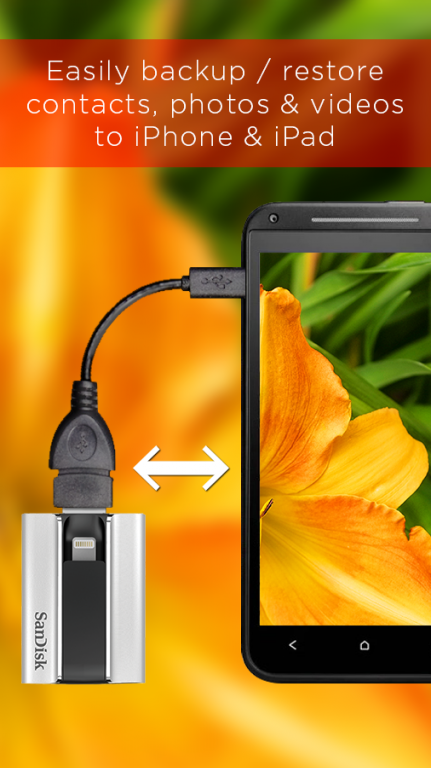
iXpand Transfer app is an Android app for SanDisk iXpand Flash Drives. With iXpand Transfer app, you can back up photos, videos, and contacts in your Android Device or microSD™ card and easily transfer them to another device without using PC, the cloud or the Internet. An iXpand Flash Drive and a USB OTG host cable are required in order to use the iXpand Transfer app. To easily backup & restore to iPhone requires the iXpand Sync app.
What is SanDisk iXpand Flash Drive?
It is a USB flash drive specially designed for smartphones, which works in the same manner as USB flash memory for carrying data of computers. You can use it with an Android device supporting OTG (USB On-The-Go) if you have a USB to OTG host cable.
All you have to do is to connect the device with the cable.
After installing the iXpand Transfer app to the Android device, just connect a USB OTG host cable to the USB connector of a SanDisk iXpand Flash Drive and connect the micro-USB connector of the cable to the Android device supporting OTG. Tap the app to get started. Some Android devices require setup of USB connection after the SanDisk iXpand Flash Drive is connected with a USB OTG host cable. For further information, please consult the instruction manual of your Android device.
Simple app anyone can use
The user interface is so simple that you can see at a glance how to backup and restore the camera and contacts. If you set "automatic backup" with the app, photos and videos will be automatically backed up every time an iXpand Flash Drive is connected. After the second connection, only new files will be automatically backed up.
Characteristics
▸ All you have to do is to connect your Android device with a SanDisk iXpand Flash Drive using a USB to OTG host cable. No PCs, cloud services or the Internet connection is necessary.
▸ You can back up photos, videos and contacts in your Android device to an iXpand Flash Drive, and easily transfer them to another device or restore them.
▸ You can also back up new photos and videos automatically every time you connect the device, if you set "automatic backup" of photos and videos.
Operating system
▸ Android OS 4.0 or later
Compatible device
▸ Android devices supporting OTG.
Results of operation verification are available at www.sandisk.co.jp/ixpand/android
▸ Compatible external storage - SanDisk iXpand™ Flash Drive
An overview of the product is available at www.sandisk.co.jp/iXpand
▸ Compatible cable - USB to OTG host cables for SanDisk iXpand™ Flash Drive
An overview of the product is available at www.sandisk.co.jp/ixpand/android
▸ Website for customer support - If you have any question about the app, please consult the SanDisk customer support website at www.sandisk.co.jp/ixpand/android
▸ Corporate information - SanDisk Corporation - A Western Digital brand. www.sandisk.co.jp
SanDisk is a trademark of Western Digital Corporation or its affiliates, registered in the United States and other countries.
©2016 Western Digital Corporation or its affiliates. All rights reserved.
About SanDisk iXpand™ Transfer
The company that develops SanDisk iXpand™ Transfer is © Western Digital Corporation or its affiliates.. The latest version released by its developer is 1.1.3.
To install SanDisk iXpand™ Transfer on your Android device, just click the green Continue To App button above to start the installation process. The app is listed on our website since 2016-11-11 and was downloaded 0 times. We have already checked if the download link is safe, however for your own protection we recommend that you scan the downloaded app with your antivirus. Your antivirus may detect the SanDisk iXpand™ Transfer as malware as malware if the download link to com.sandisk.ixpandtransfer is broken.
How to install SanDisk iXpand™ Transfer on your Android device:
- Click on the Continue To App button on our website. This will redirect you to Google Play.
- Once the SanDisk iXpand™ Transfer is shown in the Google Play listing of your Android device, you can start its download and installation. Tap on the Install button located below the search bar and to the right of the app icon.
- A pop-up window with the permissions required by SanDisk iXpand™ Transfer will be shown. Click on Accept to continue the process.
- SanDisk iXpand™ Transfer will be downloaded onto your device, displaying a progress. Once the download completes, the installation will start and you'll get a notification after the installation is finished.
Program Details
General
System requirements
Download information
Pricing
Version History
version 1.1.3
posted on 2016-11-11
1. Support additional host devices,2. Improved backup performance
Disclaimer
External Download
We do not host SanDisk iXpand™ Transfer on our servers. We did not scan it for viruses, adware, spyware or other type of malware. This app is hosted by Galad and passed their terms and conditions to be listed there. We recommend caution when installing it.
The APK Download link for SanDisk iXpand™ Transfer is provided to you by apps112.com without any warranties, representations or guarantees of any kind, so access it at your own risk.
If you have questions regarding this particular app contact the publisher directly. For questions about the functionalities of apps112.com contact us.
